Affiliate disclosure: PromptHelp may earn a commission if you buy through our WP Engine links, at no extra cost to you. Our recommendations consider the limitations as well as the benefits.
Worth considering when WordPress is important to your business.
WP Engine makes the most sense when your website earns leads, sales, or client revenue and you want less infrastructure work on your plate. Its appeal is the combination of a WordPress-focused hosting platform, recovery tools, and a repeatable development workflow.
For a small personal project, a very tight budget, or an application that does not run on WordPress, WP Engine is a less compelling fit. The decision is whether the managed workflow justifies your total bill—not whether a premium host sounds more impressive.
Check WP Engine plans →We checked WP Engine’s public pricing and support documentation on October 21, 2026. This is a research-based editorial review. We have not run a paid hosting account, a controlled speed benchmark, an uptime study, or a support-response test for this article. Product capabilities below are documented features; judgments about business fit are our analysis.
What is WP Engine?
WP Engine is a managed hosting platform for WordPress websites. WordPress is the publishing system; WP Engine supplies and manages the environment it runs on. That distinction matters if you are comparing hosting with an AI website builder: a service that helps operate WordPress does a different job from a tool that generates a website from a prompt.
The company’s platform overview describes a WordPress-focused stack and site-management tools. The practical question for a business owner is which maintenance tasks move to the provider and which still need a person on your team.
- A sensible shortlist: established business websites, content teams, and agencies working in WordPress.
- A closer technical discussion: shops, memberships, and other sites with substantial dynamic or logged-in traffic.
- A different buying journey: a non-WordPress application or someone who mainly wants an all-in-one site builder.
WP Engine pricing: look beyond the monthly headline
At the time of research, the official plans page uses Essential, Business, and Enterprise. Be cautious with older reviews that present Startup, Growth, or Scale as the current public lineup.
| Plan | Pricing shown | Main distinction |
|---|---|---|
| Essential | From $28 USD/month, billed annually; $336 upfront | Shared environment; 24/7 chat |
| Business | Contact WP Engine for a quote | Isolated resources; chat and phone; listed 99.99% uptime SLA |
| Enterprise | Custom quote and terms | Tailored capacity, onboarding, and account support |
The smallest Essential configuration lists one site, 25,000 monthly visits, and 10 GB storage. The displayed monthly equivalent is not a month-to-month payment. Promotions, renewal rates, taxes, configuration, and overages can change the amount due. Compare current WP Engine managed WordPress hosting plans and confirm the checkout terms before buying.
Three costs to clarify before you subscribe
- Traffic and capacity. WP Engine’s billable-visits documentation counts unique IP addresses per day, with specified exclusions. That can differ from your analytics sessions. Its overage article names older plans when quoting a rate, so do not assume that rate applies to a new Essential account. Ask for the exact overage terms for your chosen plan.
- Optional features. Enhanced update automation, monitoring, and edge security may change your bundle. WP Engine documents these separately as product extensions. Decide what you actually need before calculating your total cost.
- Email and maintenance work. Budget for email services and any developer or agency work your site still needs. Managed hosting does not remove every operating expense.
The WP Engine features that matter in everyday work
1. Separate environments for safer changes
WP Engine groups a site into production, staging, and development environments. These are separate WordPress installations, described in its Sites and Environments guide. That gives a team somewhere to investigate an issue or prepare a change before touching the public site.
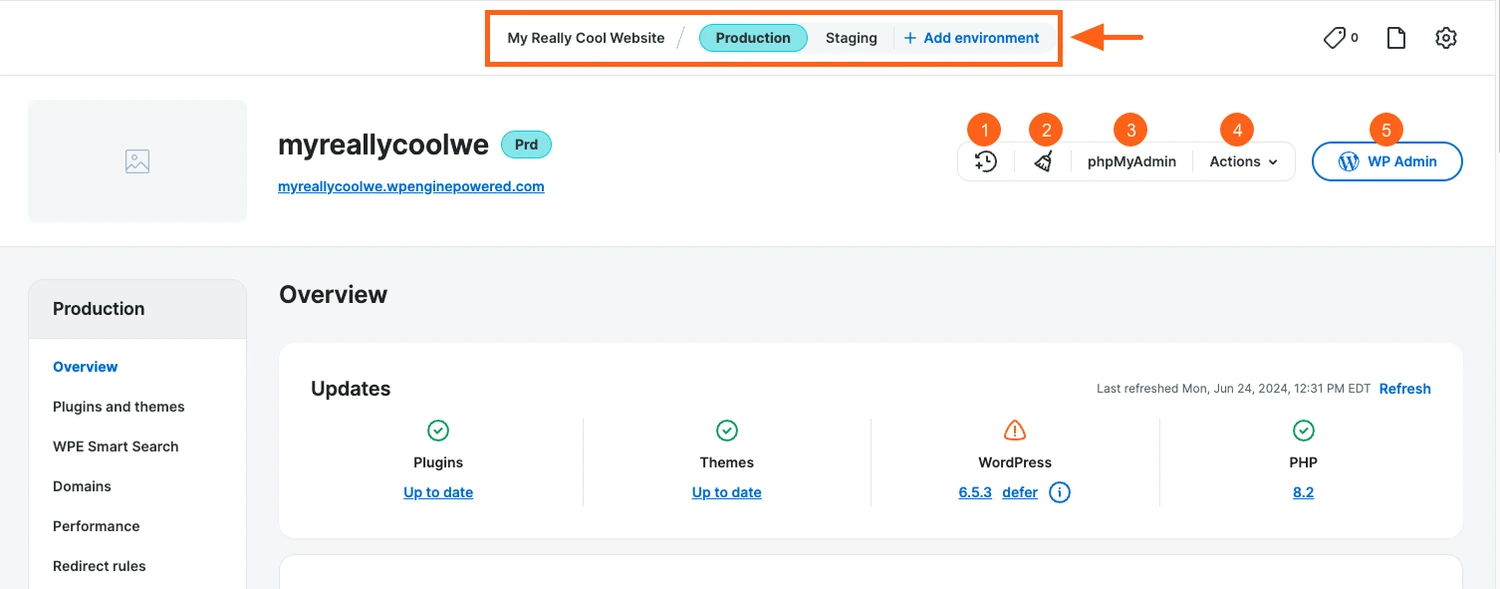
For a small agency, this is a more useful buying factor than a long feature checklist. A repeatable workflow—copy, change, test, approve, deploy—can make client work easier to organize. You still need to decide which files or database content should move. A store’s new orders should not be casually overwritten by an older staging database.
2. Backups with a practical recovery path
The backup documentation describes automatic daily checkpoints, manual backups, offsite storage, and restore or download options. It states that 30 days of backups are available in the portal.
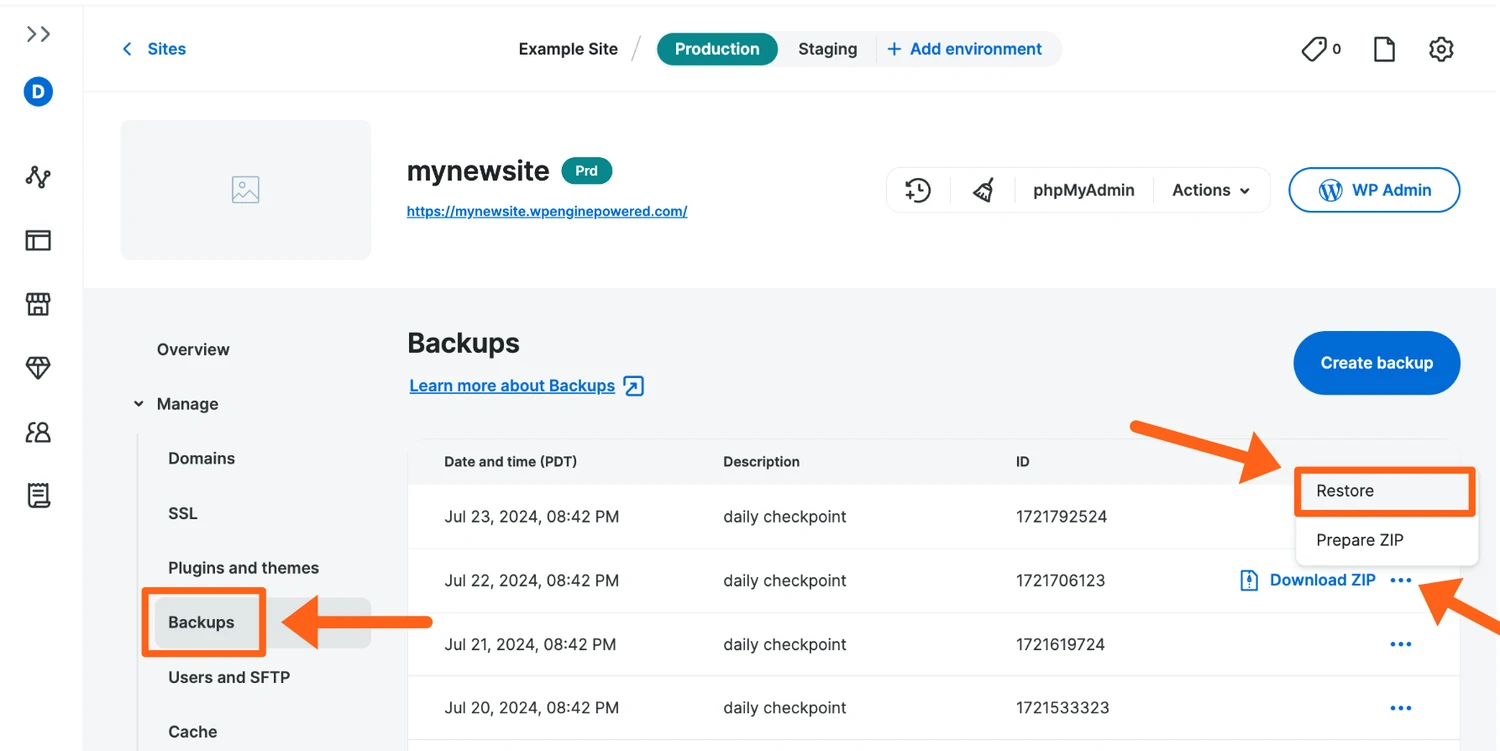
The useful habit is to create a fresh checkpoint before a risky update and understand the restore process in advance. For an active shop, also plan how you would preserve transactions created after a checkpoint. A backup schedule is valuable, but it is not the same thing as a recovery procedure your team has rehearsed.
3. Built-in caching, with workload-specific limits
WP Engine’s cache guide explains server and browser caching, cache controls, and exclusions. Caching can reduce repeated work for reusable content. It cannot make every request identical: a public article and a customer-specific account page have different needs.
Before paying for a larger plan, identify what is slow. A heavy theme, a third-party script, an inefficient query, or a checkout integration may need attention even on managed hosting. Ask about the pages and peak concurrency that matter to your own business.
4. Update automation that needs its own evaluation
Smart Plugin Manager offers scheduled plugin and theme updates, pre-update backups, visual checks, and automatic rollback when a visual test fails. These capabilities can be useful for teams maintaining several sites.
Visual checks are one layer of verification. They do not establish that every form submits correctly or that an order reaches your payment and fulfillment systems. Confirm the license included in your selected plan and keep functional checks for critical workflows.
5. WordPress help, with a defined scope
The support policy covers the hosting platform and explains limits around third-party themes, plugins, and custom code. WP Engine does not promise to write your code, redesign your site, or do your SEO.
This is a useful boundary when you are estimating value. Hosting support can help investigate a platform problem; a developer may still need to fix your checkout customization. We have not measured queue times or resolution quality, so this review does not rate support responsiveness.
WP Engine pros and cons
What we like
- A focused WordPress workflow rather than a collection of unrelated hosting products.
- Separate places to develop, test, and operate a site.
- Documented recovery tools that support a disciplined update process.
- A clear path to discuss more demanding workloads with the provider.
What to weigh carefully
- The total cost can be difficult to judge from a starting price alone.
- Platform restrictions may require changes to your existing setup.
- Email services and custom development remain separate responsibilities.
- Documented capabilities do not prove speed or reliability for your particular site.
Plugin restrictions are a real migration check
WP Engine maintains a disallowed-plugins list, including some caching and backup tools. The stated reasons include conflicts with the platform and performance or security concerns. That is a tradeoff of using a managed environment.
Export your plugin inventory before moving. For every essential tool, confirm compatibility or identify a replacement. Do not assume that a plugin being popular elsewhere means it belongs in this hosting setup.
Email is not an included business mailbox service
WP Engine’s email guide recommends an external provider for robust sending, monitoring, and scale. It does not supply email-hosting MX or DKIM records. Plan separately for staff inboxes and important transactional mail such as receipts or password resets.
Performance and uptime: what this review can verify
We can verify that WP Engine documents performance tools and publishes plan-specific service commitments. We cannot turn those descriptions into a measured claim about your future website. An uptime SLA is a contractual provision with conditions, not a record of the uptime we observed.
Before migrating a revenue-producing site, compare the same site on both environments. Keep the theme, plugin set, page content, test location, and cache state consistent. Check:
- A normal landing page on mobile, including third-party scripts.
- An uncached or logged-in workflow such as account access.
- The actual lead form or checkout, including the email it triggers.
- Behavior during a realistic traffic spike—not only a single page load.
- Your recovery steps if the deployment needs to be reversed.
Record the dates, tools, configuration, and repeated results. Until those tests exist, “fastest host,” a promised conversion lift, or a numeric performance score would overstate the evidence.
Start with your business needs, then compare the full cost.
A stronger fit
- WordPress is your chosen platform.
- Your website supports leads, sales, or client revenue.
- You value a managed development and recovery workflow.
Review carefully
- Your hosting budget is very tight.
- You run an application that is not built on WordPress.
- Your essential plugins have not been checked for compatibility.
Use business fit, maintenance needs, and compatibility to narrow the shortlist. Then review WP Engine hosting plans for business WordPress sites before judging performance claims.
Before you move: a seven-point checklist
- Map the current setup. List plugins, integrations, DNS records, inboxes, forms, cron jobs, and any custom code.
- Measure usage. Gather traffic, storage, bandwidth, and busy-period information. Ask how these map to the proposed plan.
- Confirm the full quote. Include add-ons, renewals, migration assistance, taxes, and possible overages.
- Make a copy and a recovery plan. Keep an independent backup and decide who can authorize a rollback.
- Test the business journeys. Check checkout, forms, logins, search, analytics, consent settings, and email delivery.
- Protect search visibility. Preserve URLs and redirects; confirm canonicals and indexing settings. Keep staging out of search.
- Plan the cutover. Choose an appropriate window, account for changes made during migration, and keep the old host available until verification is complete.
The official setup guide describes automated and manual migration paths. Ask which path and level of assistance apply to your account rather than assuming every plan includes the same service.
Our recommendation: shortlist it for the workflow, then validate the fit
WP Engine is a credible candidate for a business that has chosen WordPress and wants a structured hosting and maintenance environment. The strongest reason to consider it is an operating model your team will use: test changes away from production, keep recovery options ready, and clarify responsibility when something fails.
We would be more cautious if you are buying primarily for a promised speed boost, stretching a hobby-site budget, or relying on a plugin stack that has not been checked. In those situations, work out whether the full cost addresses the problem you need to solve.
For teams using AI to create copy or code, the same principle applies: publishing faster makes a dependable approval and testing process more valuable. Hosting is one part of that process.
WP Engine review FAQs
Is WP Engine worth it for a small business?
It can be worth considering when WordPress supports important business activity and the managed workflow replaces work you would otherwise pay for. For a very small, low-maintenance site, check whether the ongoing cost is justified by the maintenance work you need.
How much does WP Engine cost?
WP Engine’s total cost depends on the plan, number of websites, traffic and storage needs, billing period, optional features, taxes, and possible overages. Promotional and renewal terms can change, so confirm the full amount due today and the renewal price before subscribing.
Does WP Engine include email hosting?
It is not a business mailbox host. Plan for an external email provider and verify delivery for important messages from your website.
Can I use every WordPress plugin?
No. Check the official disallowed-plugins list and any compatibility requirements before migrating. The restrictions can affect caching, backup, and other parts of an existing setup.
Will WP Engine automatically improve my SEO?
No host can promise that from a hosting plan alone. Measure the performance of your actual pages and preserve crawlability, content quality, URLs, and redirects during a move.
Did PromptHelp test WP Engine’s speed?
No. This review evaluates documented capabilities and business fit. It does not present hands-on speed, uptime, or support results.
Ready to try WP Engine? See current plans and pricing.
Try WP Engine →