Affiliate disclosure: PromptHelp may earn a commission if you buy through our Chatfuel links, at no extra cost to you. Our recommendations consider the limitations as well as the benefits.
Useful when social and messaging conversations already drive your sales process.
Chatfuel is built to automate lead capture, qualification, sales, booking, and support conversations across WhatsApp, Instagram, and Facebook, with additional channel options. Its strongest use case is not “having a chatbot”; it is turning an existing stream of messages into a consistent, measurable workflow with a clear human handoff.
It is a weaker fit when customers rarely contact you through supported channels, your process needs deep help-desk case management, or variable AI and messaging costs are difficult to forecast.
Check Chatfuel plans →We checked Chatfuel’s public pricing, product pages, and help documentation on October 21, 2026. This is a research-based editorial review. We have not operated a paid production bot, measured AI accuracy, or tested Meta message delivery. Documented capabilities are separated from our analysis of business fit.
What is Chatfuel?
Chatfuel is an AI chatbot and messaging-automation platform for customer conversations. Businesses can connect channels, define automated behavior, collect lead details, sell in chat, book appointments, send campaigns, and route conversations to a shared team inbox.
The platform is most relevant when a business already receives meaningful inbound demand from comments, direct messages, click-to-message ads, or WhatsApp. Automation can then respond quickly and collect structured information before a person takes over.
- A sensible shortlist: social-first commerce, appointment businesses, property teams, local services, and agencies managing client bots.
- A closer compliance review: businesses sending WhatsApp templates or handling sensitive customer information.
- A different requirement: teams that need a full ticketing system, voice contact center, or broad omnichannel service desk.
Chatfuel pricing: plan fee plus channel economics
Chatfuel’s current public pricing centers on a Business plan and agency tiers. Annual billing reduces the displayed monthly equivalent but requires payment for the year. Included AI credits and workspace capacity vary by tier.
| Plan | Price shown annually | Main distinction |
|---|---|---|
| Business | $18 per month equivalent; $216 billed yearly | One business workspace with $20 monthly AI credits |
| Agency S | $90 per month equivalent; $1,080 billed yearly | Three companies, agency dashboard, and $100 monthly AI credits |
| Larger agency tiers | Higher capacity and monthly fee | More bots, shared credits, and agency scale |
The price of the subscription is only one part of the budget. AI usage, WhatsApp template charges or Meta fees, and connected tools can affect total cost. “Usage limits apply” should be treated as a calculation step. Compare current Chatfuel AI chatbot plans and confirm billing frequency, credits, channel fees, and limits before buying.
Three costs to clarify
- Conversation volume. Estimate inbound chats, automated replies, follow-ups, and broadcast recipients during normal and peak campaigns.
- WhatsApp charges. Separate Chatfuel’s subscription and wallet from charges governed by Meta, message category, and recipient country.
- Human coverage. Budget the staff time needed to take over qualified, unusual, sensitive, or frustrated conversations.
The Chatfuel features that matter in everyday work
1. Channel connections and automation rules
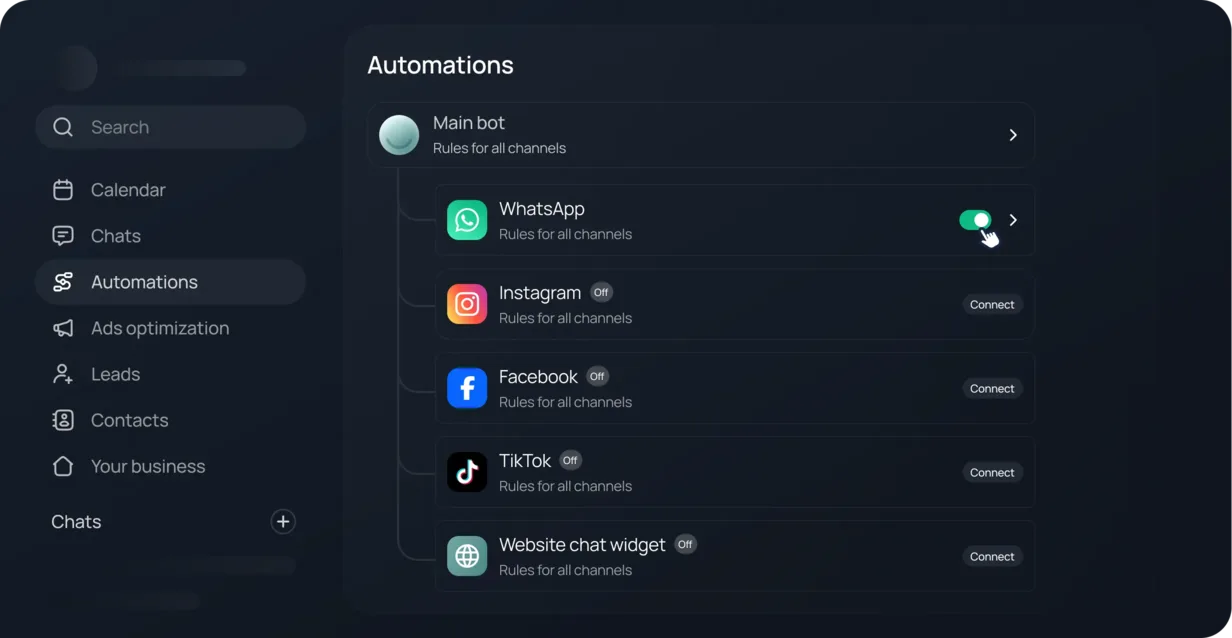
Chatfuel supports automation across WhatsApp, Instagram, and Facebook, with TikTok and a website chat widget also shown in the product. Each channel has its own permissions, triggers, and messaging policies. Build the workflow around the channel’s rules rather than copying one bot everywhere.
2. AI-led qualification, selling, and booking
An AI agent can answer questions, collect details, recommend an offer, and move toward a booking or purchase. The result depends on the instructions and source information you provide. Define what the agent may promise, which questions require a person, and what information must never be invented.
3. Comment and ad response workflows
Automated replies to post and Reels comments can move interested people into a direct conversation. Click-to-message and conversion integrations can connect advertising activity to downstream actions. Make sure the first response matches the ad promise and does not create an unexpected marketing subscription.
4. Shared inbox and human handoff
A team inbox is essential for exceptions. Chatfuel documents behavior that stops follow-ups when a team member takes over, which helps prevent an automation from interrupting a live conversation. Test takeover, reassignment, after-hours behavior, and the path back to automation.
5. CRM and integrations
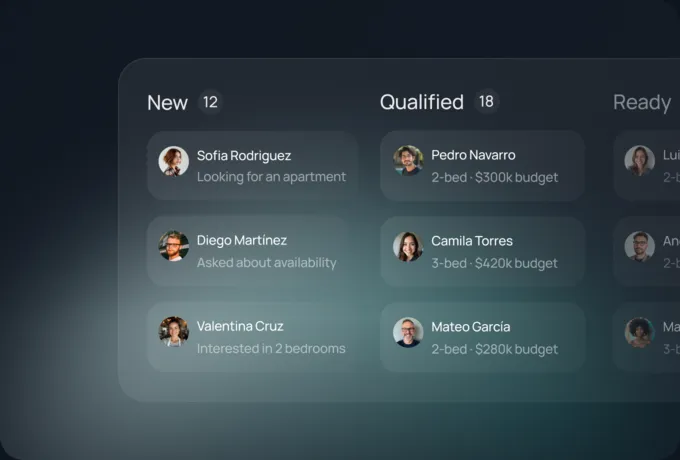
Chatfuel includes contact management and advertises integrations with services such as Google Sheets and Zapier. Decide which system owns each field. A bot should not create conflicting contact, booking, or deal records across tools.
Chatfuel pros and cons
What we like
- Clear focus on conversations that lead to sales or bookings.
- Support for major Meta messaging channels in one workspace.
- Human inbox and takeover behavior alongside automation.
- Agency tiers for managing several client businesses.
What to weigh carefully
- Total cost includes credits, channel fees, and usage limits.
- Bot quality depends on instructions, data, and exception design.
- Messaging policies and consent requirements change by channel.
- It is not a replacement for every service-desk workflow.
AI conversations need boundaries
Write approved claims, prices, service areas, escalation topics, and unavailable actions into the operating plan. Review transcripts for repeated failure patterns. A confident answer is not evidence that the answer is correct.
WhatsApp is not priced by the software vendor alone
Chatfuel can provide official API access, while Meta’s rules and country-based pricing still affect the channel. Confirm message categories, templates, customer-service windows, wallet behavior, and current fees for the markets you serve.
Performance: what this review can verify
We can verify the current plan presentation, listed channels, AI and team-inbox capabilities, and documented integration model. We cannot verify a conversion lift, accuracy rate, response time, or customer-satisfaction improvement for your business.
A controlled pilot should measure:
- Correct answers across common, ambiguous, and unsupported questions.
- Lead fields captured accurately and passed to the right system.
- Booking, purchase, and human-handoff completion.
- Message cost and AI credit use per successful outcome.
- Opt-out, deletion, and escalation behavior.
Start with a real conversation stream and a measurable outcome.
A stronger fit
- Customers already contact you through WhatsApp or social DMs.
- You have a repeatable qualification, sales, or booking flow.
- Your team can monitor transcripts and handle escalations.
Review carefully
- Conversation volume is too low to justify automation.
- You cannot forecast AI and channel usage costs.
- Your use case needs deep ticketing or sensitive-case workflows.
Pilot one conversation and define the human handoff before scaling. Then review Chatfuel plans for WhatsApp and social messaging automation.
Before you launch Chatfuel: a seven-point checklist
- Pick one outcome. Start with a qualified lead, booked appointment, or resolved common question.
- Write the knowledge boundary. List approved answers, prohibited claims, and escalation topics.
- Map consent. Document triggers, templates, opt-outs, and retention for every channel.
- Connect a test account. Avoid launching first changes into the busiest production inbox.
- Test edge cases. Use typos, vague questions, complaints, refunds, and requests the agent cannot complete.
- Train the human team. Define takeover ownership, response expectations, and conversation notes.
- Review unit economics. Track cost per qualified lead, booking, or completed support outcome.
Our recommendation: choose it for a defined messaging workflow
Chatfuel is worth shortlisting when WhatsApp, Instagram, or Facebook conversations already influence revenue and the business has a repeatable path from question to outcome. The combination of automation, AI, lead stages, and team takeover can make that path more consistent.
We would be cautious if the use case is simply “add AI,” if policies and escalation rules are undefined, or if success cannot be measured beyond reply count. Prove one channel and one outcome before adding more bots or clients.
Chatfuel review FAQs
Which channels does Chatfuel support?
Its current public material centers on WhatsApp, Instagram, and Facebook, and also shows TikTok and website chat capabilities. Features and eligibility can differ by channel and region.
How much does Chatfuel cost?
The Business plan was shown at an $18 monthly equivalent when billed annually, and Agency S at $90 monthly equivalent when billed annually. Monthly billing, larger tiers, usage, AI credits, Meta charges, and taxes can change the total.
Does Chatfuel include a human inbox?
Yes. Current plan material includes a shared team inbox. Test assignment, takeover, and return-to-automation behavior with your own process.
Can Chatfuel book appointments?
Chatfuel advertises automated booking in chat. Verify calendar availability, time zones, rescheduling, cancellation, reminders, and duplicate-booking prevention.
Are WhatsApp fees included?
Do not assume every WhatsApp cost is covered by the subscription. Confirm current Chatfuel credits, wallet behavior, Meta fees, message categories, and recipient-country pricing.
Did PromptHelp test Chatfuel’s AI accuracy?
No. This review evaluates current documentation and business fit. It does not present hands-on accuracy, delivery, support, or conversion results.
Ready to try Chatfuel? See current plans and trial terms.
Try Chatfuel →